
There’s a hidden tax you as a data scientist and ML engineer pay every day when working in notebooks, and it starts before the work even begins.
You spin up a notebook and wait. Five minutes. Ten. Sometimes longer, just to import a library. Other times the environment is already running, but now you’re guessing compute sizes, watching costs creep up, and hoping your experiment doesn’t trigger a FinOps alert.
And when you need something like GPU access, production data, or updated permissions, it turns into a ticket. Then a sprint. Sometimes two. By the time everything is ready, the momentum is gone. The idea you had at the start of the week? Buried under infrastructure friction.
This isn’t just an inconvenience. It’s one of the biggest reasons AI projects stall between pilot and production.
Developers and teams can get models working in notebooks. They can connect data, run experiments, and even show early results. But the moment they try to scale—when workloads become unpredictable, concurrency increases, costs need to be controlled, and production SLAs need to be met —the project starts to slow down.
What’s missing isn’t another tool. It's an autonomous AI platform that can anticipate demand, manage resources, and enforce business SLAs. That’s what the Teradata Autonomous Knowledge Platform is designed to do.
Core capabilities of the Autonomous Knowledge Platform
At its core, the Autonomous Knowledge Platform provides three foundational capabilities:
- Autonomous Tera agent execution that continuously optimizes performance, cost, and scale across production workloads
- A compute layer with always‑on active compute for mission‑critical and agentic workloads, alongside elastic compute for on‑demand workloads
- A connected data foundation that brings together low-latency local storage, and cost optimized object stores under a single architecture, with support for open table formats and Enterprise Vector Store
These capabilities operate continuously, and AI Studio is where developers experience them in practice. Let’s explore the platform, Tera agents, and notebooks via AI Studio.
AI Studio: the developer workspace for building and scaling AI
AI Studio is the unified workspace where developers build, manage, and scale AI outcomes on the Autonomous Knowledge Platform.
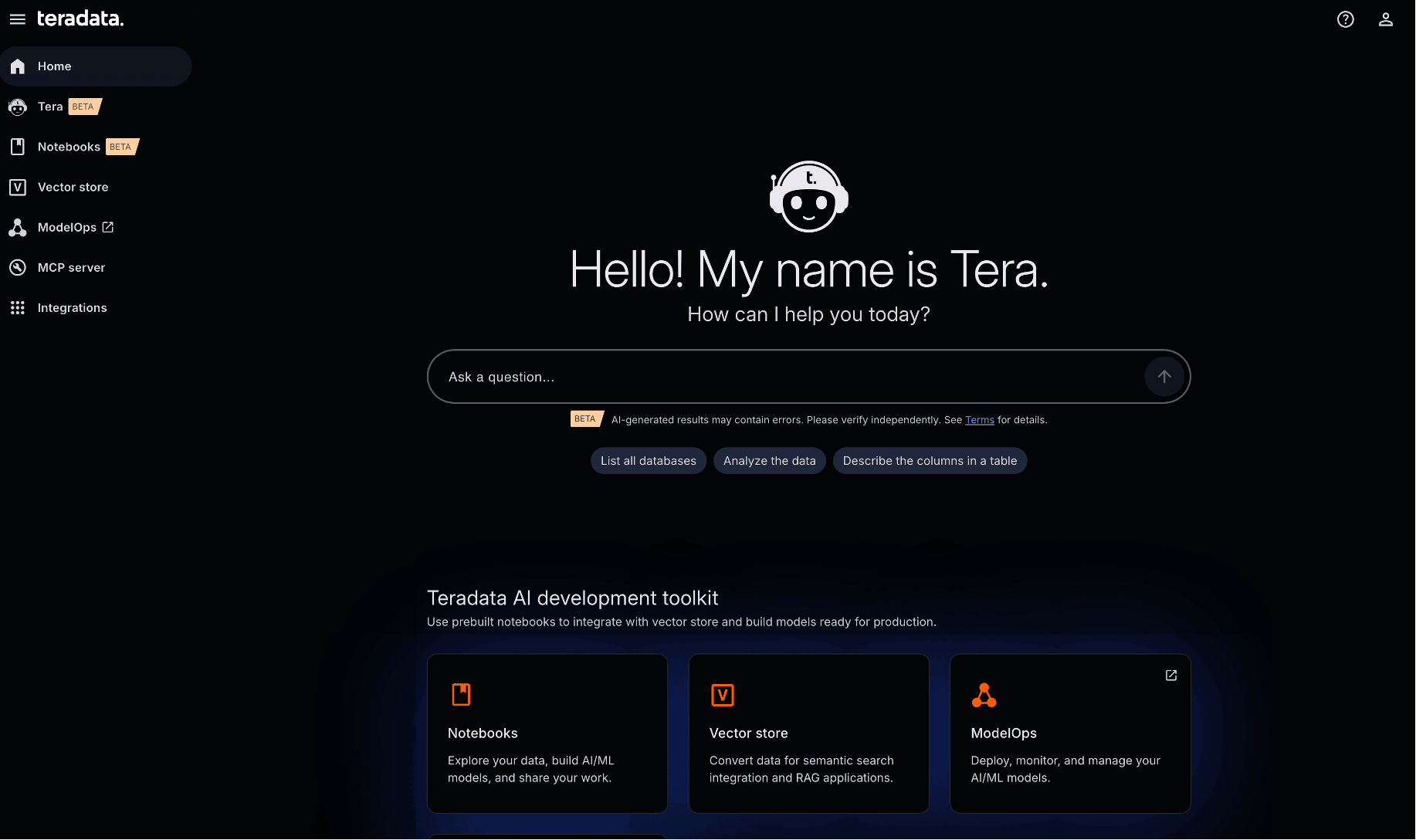
AI Studio: where developers build, manage, and scale outcomes on the Autonomous Knowledge Platform
It isn’t a replacement for existing Teradata environments. Instead, it runs on top of your Teradata systems without requiring data migration or environment re-creation.
From AI Studio, developers work with integrated:
- Notebooks for SQL, Python, and analytics workflow experimentation, development, and collaboration with team members
- ModelHub to access, monitor, and manage production‑ready models (including embedding and chat models) with visibility into token and cost usage
- ModelOps to create, manage, and run models at scale
- Vector Store to store and manage data as vector embeddings for search integration and RAG applications
- Built‑in Tera agents that perform a range of tasks from data analysis to continuously managing infrastructure
Everything we’ll explore below happens inside AI Studio, running directly on the Autonomous Knowledge Platform.
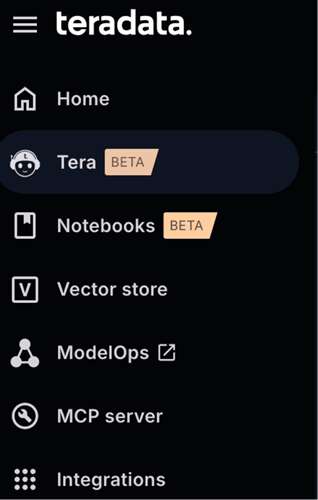
A single workspace for notebooks, models, vectors, and agents
Tera and autonomous AI agents for production workloads
Tera is Teradata’s autonomous AI-powered workspace, serving as the natural language interface with enterprise-grade agent execution environments.
You can ask Tera to:
- Get information about your system or environment
- Retrieve and analyze schema information, table structures, and column definitions
- Assist in identifying data suitable for visual representation
Tera operates under existing Teradata permissions, ensuring users only see data they are authorized to access.
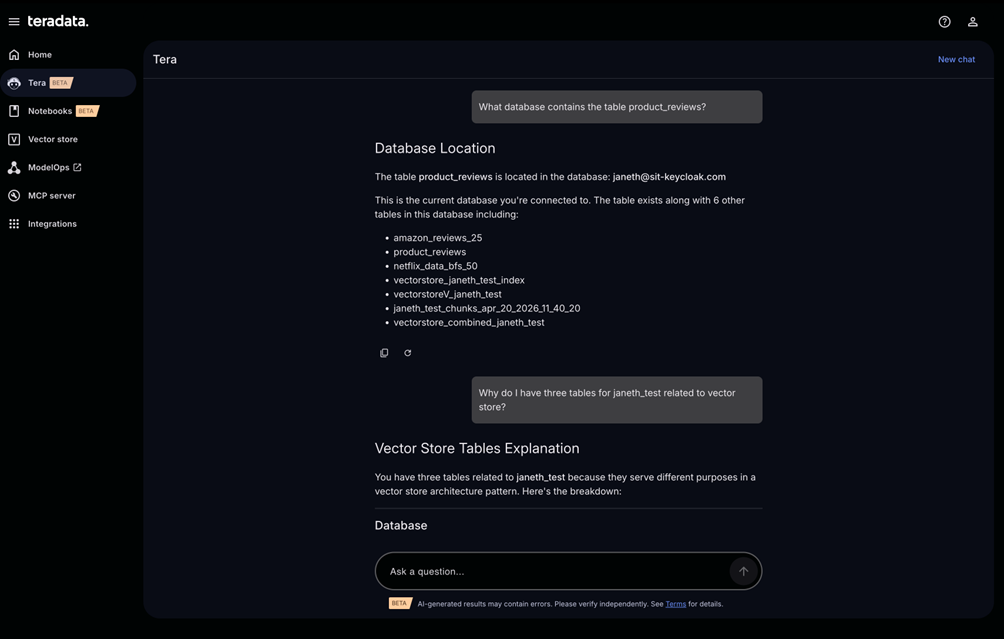
Tera is a natural language interface with enterprise-grade agent execution environments.
Tera includes built-in modes for data analysis with Tera Analyze, coding with Tera Code, and multi-agent system automation and orchestration with Tera Claw.
How Tera agents automate scaling, cost, and governance
Tera agents operate across the spectrum of autonomy from deterministic automation to policy‑governed autonomous actions, within a secure agent harness and runtime.
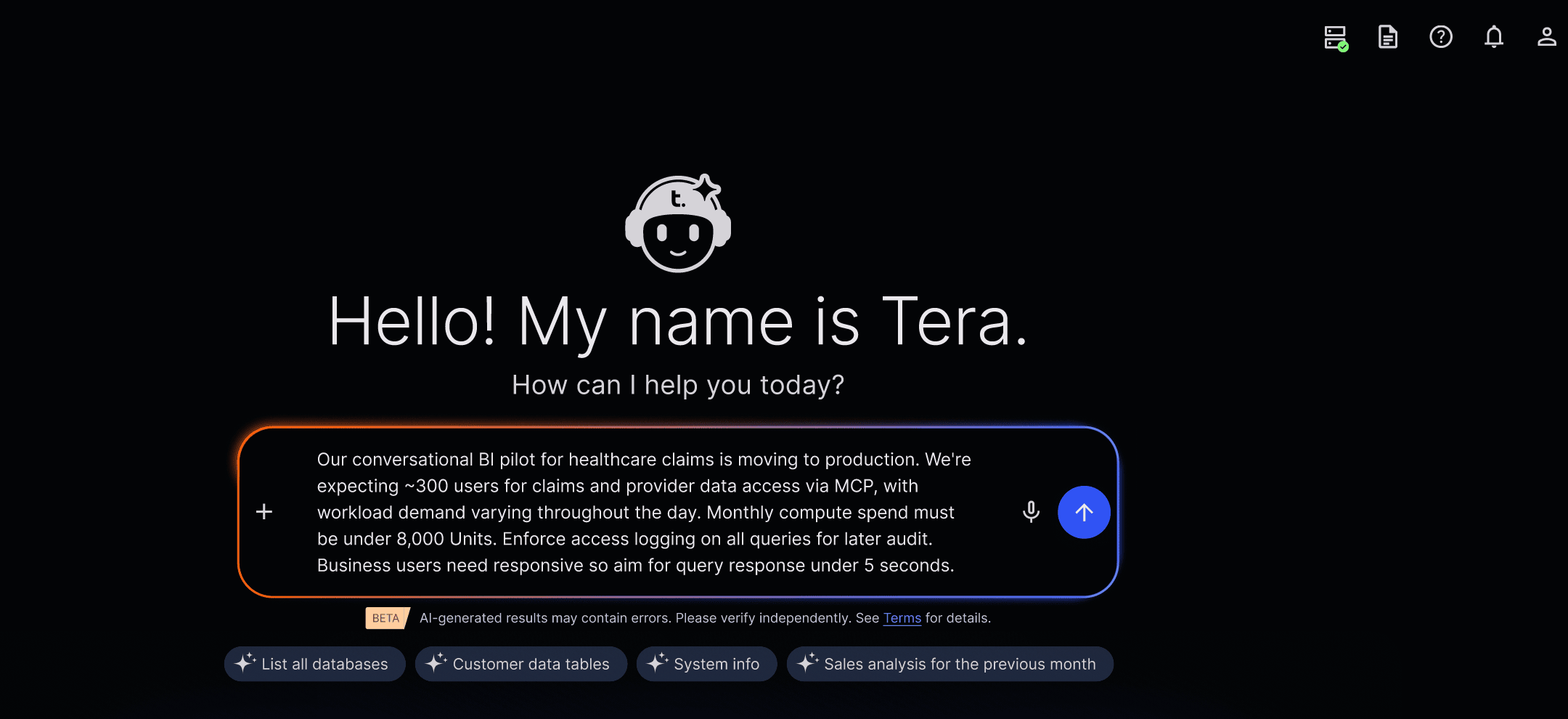
Tera provides a natural-language interface for governed execution and agentic workflows.
For example, a healthcare claims team runs conversational analytics over three years of data. The pilot proved value. Users love it! Now the challenge begins when moving the pilot into production.
Traditionally, moving to production means:
- Refactoring notebook‑based code and models to run repeatedly, autonomously, and at scale
- Capacity planning meetings
- Cost modeling sessions
- Tickets for elastic clusters
- Manual tuning as concurrency spikes
With the Autonomous Knowledge Platform, an administrator expresses their intent to Tera in plain language and the agents handle that work automatically.
“We’re expecting ~300 users for claims and provider data access via MCP, with workload demand varying throughout the day. Monthly compute spend must be under 8,000 units. Enforce access logging on all queries for later audit. Aim for query response under 5 seconds.”
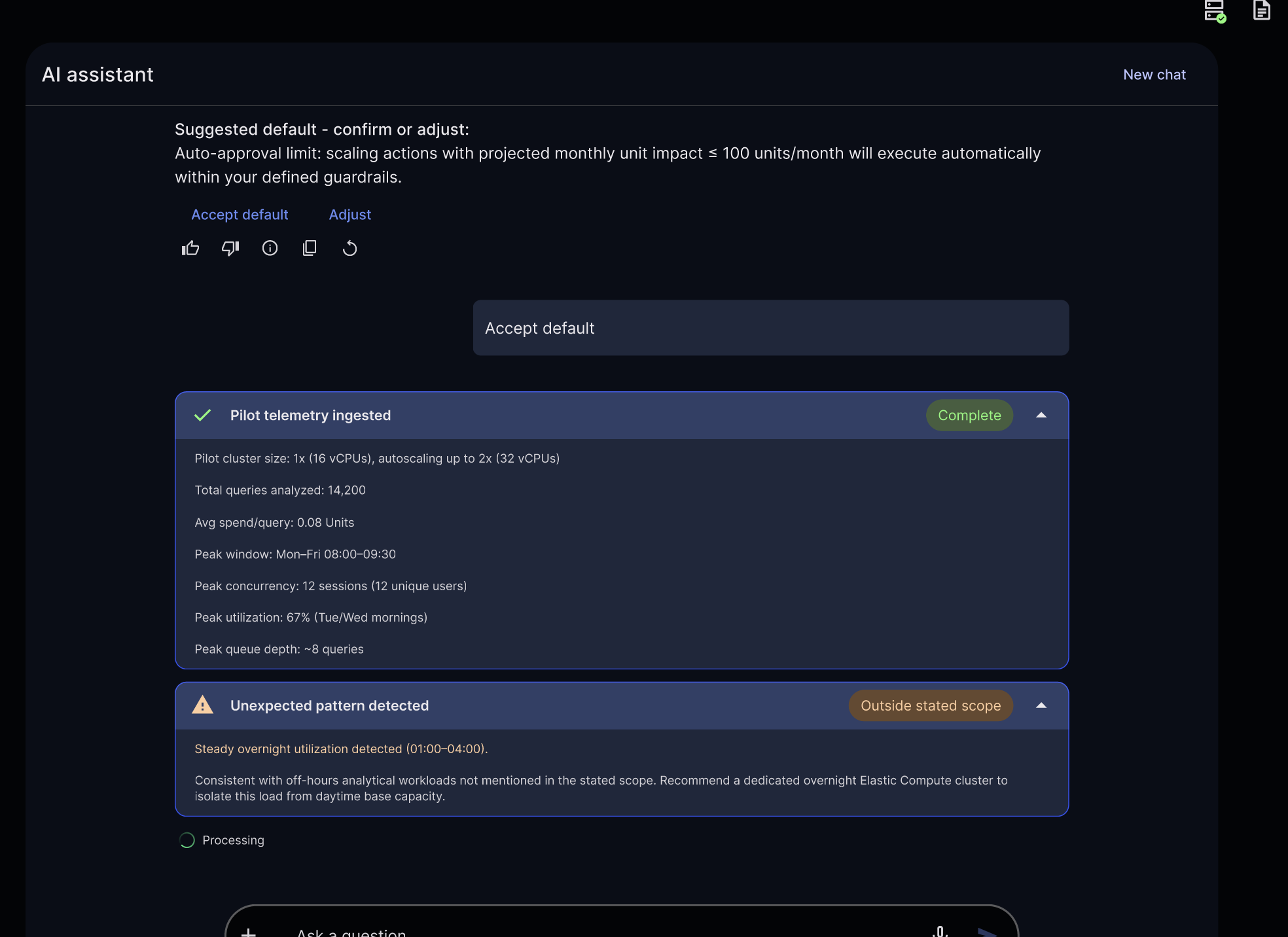
Define intent (users, cost ceiling, SLAs); the autonomous knowledge platform analyses telemetry and identifies patterns and inefficiencies.
Once the administrator approves the proposed deployment, the agents:
- Analyze pilot data around usage, performance, and cost
- Identify usage patterns and inefficiencies
- Recommend elastic compute configurations
- Show projected cost, performance, and impact up front
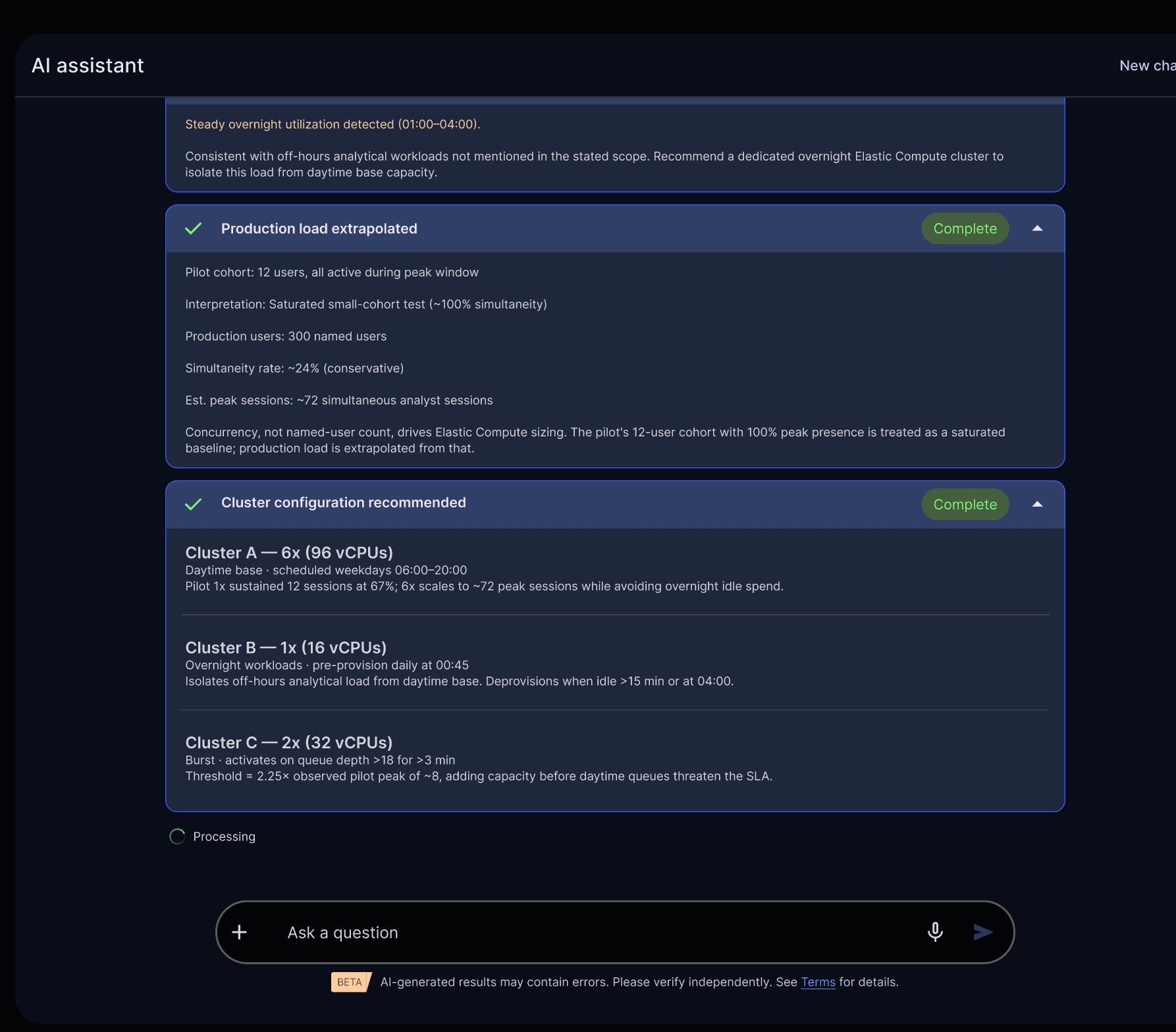
Autonomous agents surface tradeoffs up front: projected cost, performance, and impact
The required changes within predefined guardrails are executed automatically. Larger or riskier changes wait for human approval.
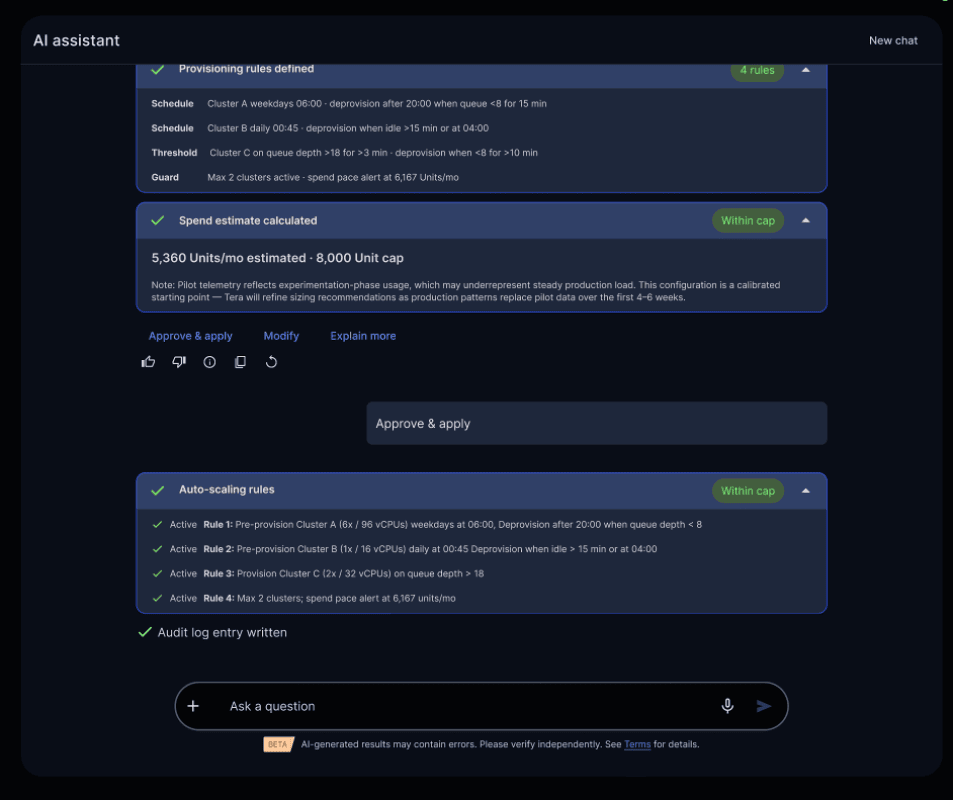
Built-in guardrails help an autonomous knowledge platform automate safely
Every action is logged. Every decision is auditable.
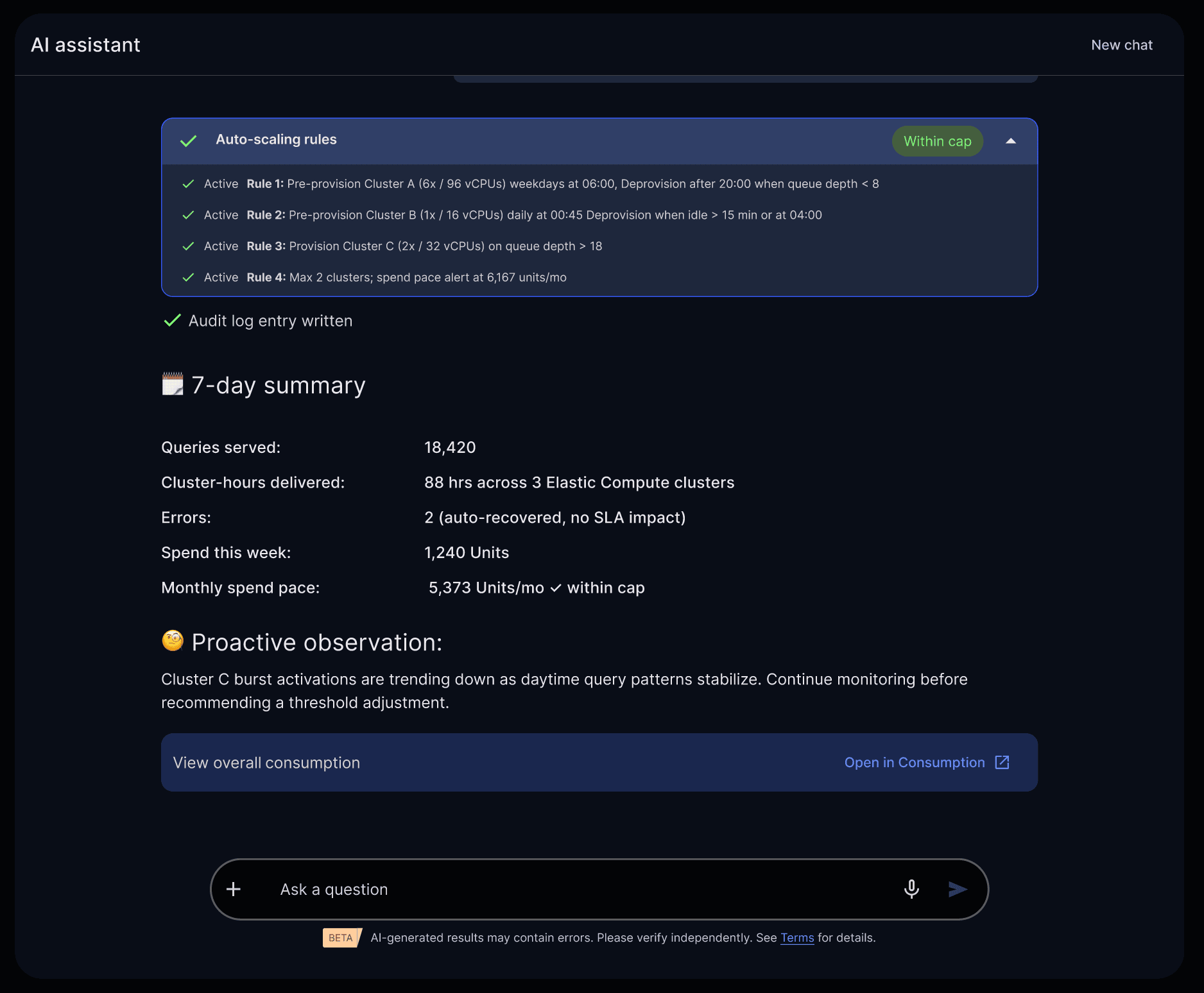
Real-time visibility into auto-scaling, usage, and cost—managed automatically by Tera agents within defined guardrails.
What this means for you is simple:
- You don’t wait for infrastructure
- You don’t tune clusters
- You don’t negotiate for resources
- You don’t move data out of the platform
Tera agents give you the ease, speed, and flexibility developers love. While delivering the governance, cost control, and predictability enterprises demand.
Tera agents remove infrastructure pain points for productionizing AI workloads. Notebooks continue to be where developers explore data, build models, and iterate ideas during development. Agents take over when those ideas move toward production. Once a workflow proves value, platform-level agents handle deployment, scaling, cost controls, and governance, using real telemetry and human-defined intent.
Running AI Workloads at Scale with Notebooks + In-Database AI
Let’s explore how we build AI solutions with Notebooks in AI Studio. From the Notebooks tab in AI Studio, we can start a session and select our desired compute resources. Compute pools are configurable by each organization and can scale to meet the performance, cost, and workload requirements of the business. For example, in my environment I can select from:
- General Compute: for data exploration, analytics, and in-database functions. This profile runs on up to five nodes with 16 vCPUs and 64 GB of RAM.
- High Memory: for large datasets and memory‑intensive workloads that require substantial in‑memory processing. This profile contains up to three nodes with 64 vCPUs and 512 GB of RAM.
In this example, I’ve selected General Compute to demonstrate text analytics with native LLMs in ModelHub.
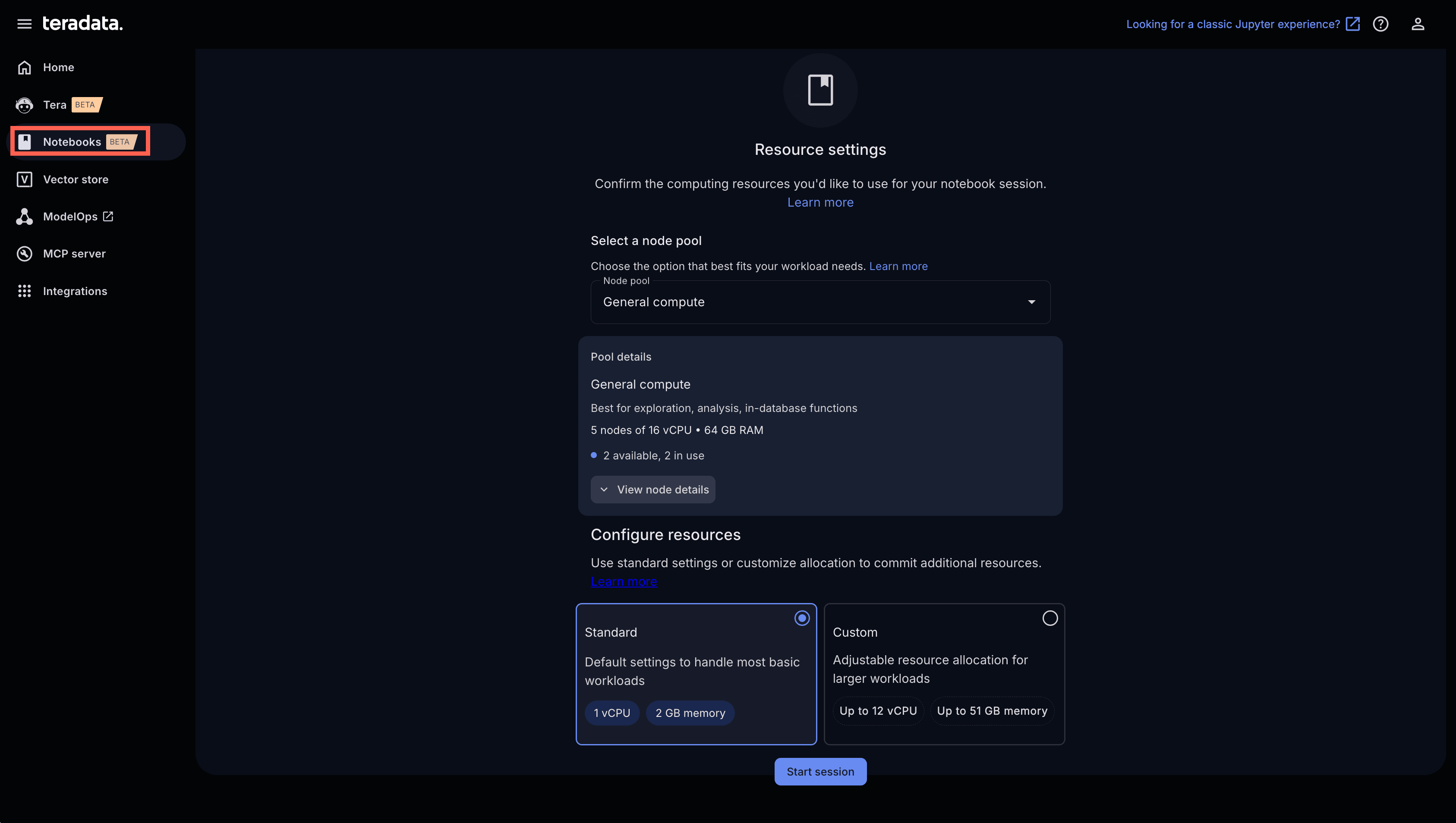
Start a notebook session and select the right compute pool for your workload.
Choose a notebook and kernel and begin running Python against data in Teradata
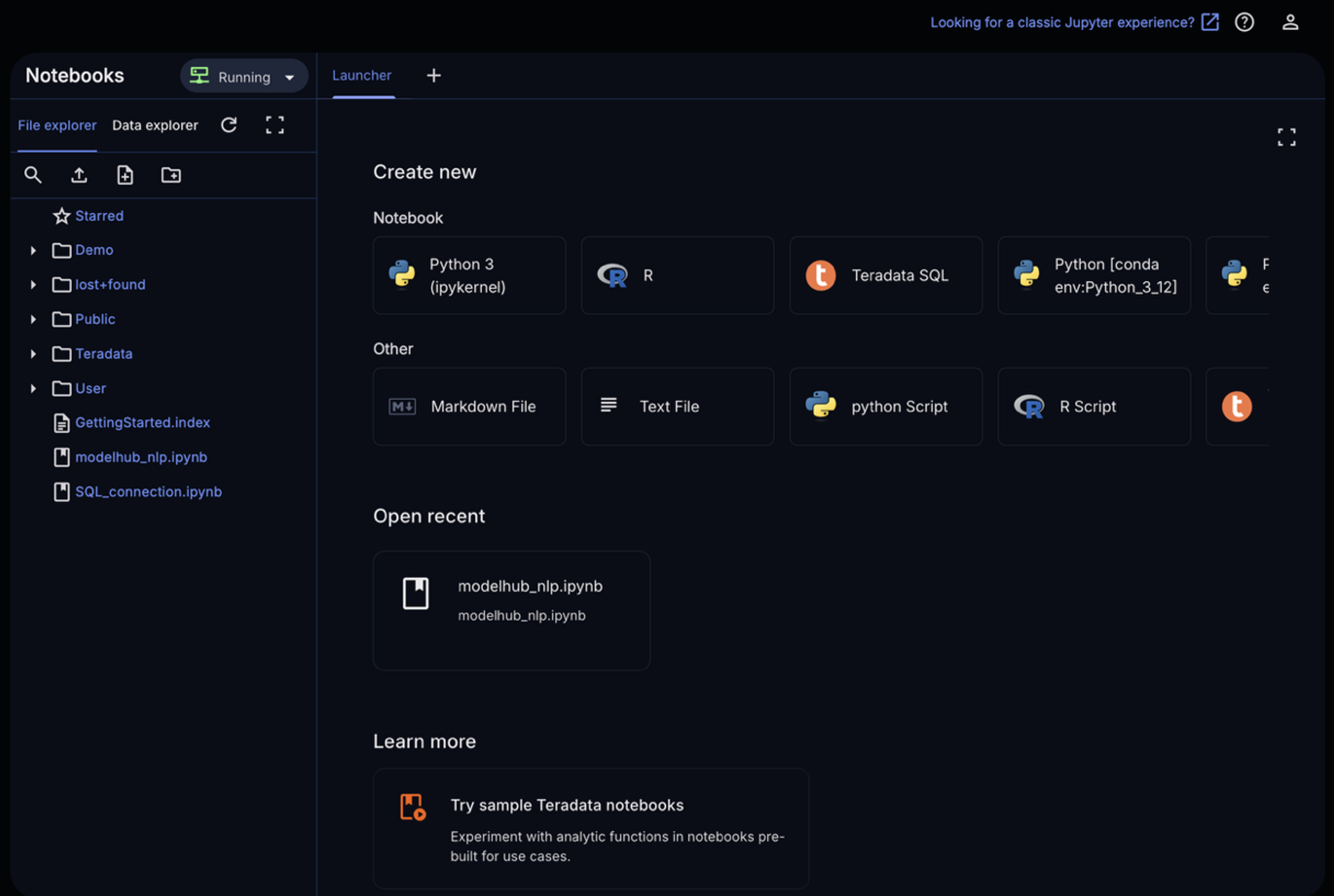
Run Python/SQL where the data lives without moving data out of the platform
Below is an example of using Python to run complex text analytic workflows using Teradata’s generative AI package and production-ready LLMs and embedding models.
First, we establish a connection to the Teradata system.
from teradataml import create_context


# ── Connect to Vantage ────────────────────────────────────────────────────────

eng = create_context(

host='{db_host}', # Replace with your database host

username='{db_username}', # Replace with your database username

password='{db_password}', # Replace with your database password

logmech='TD2')
We load sample product review data into Teradata with the copy_to_sql() method, which converts a pandas DataFrame into a Teradata table.
import pandas as pd

from teradataml import copy_to_sql, DataFrame


# ── Sample data: customer feedback with PII embedded in text ──────────────────

feedback_pd = pd.DataFrame({

'review_id': [1, 2, 3, 4, 5],

'product': ['SmartWatch X1', 'SmartWatch X1', 'Laptop Pro 15', 'Laptop Pro 15', 'EarBuds Z'],

'review': [

"Hi, this is Emily Carter from San Francisco. I love the battery life on the SmartWatch X1 — it lasts nearly 5 days on a single charge. You can reach me at emily.carter@gmail.com if you have questions.",

"I’m Michael Rodriguez in San Jose. The watch looks great, but the strap broke after two weeks. Support asked me to call 408-555-0147, but I haven’t been able to get through yet.",

"Feedback from Sarah Nguyen: the Laptop Pro 15 has blazing-fast performance and a stunning display. My receipt was emailed to snguyen@outlook.com.",

"This is David Thompson (dthompson@company.com). I use this laptop for heavy development workloads, and it gets very hot. The fan noise is pretty distracting during long builds.",

"Jessica Lee here. The EarBuds Z have crystal-clear audio and excellent noise cancellation. Feel free to text me at 310-555-0168 if you’d like more detailed feedback."

]

})


copy_to_sql(

feedback_pd,

table_name='customer_feedback',

if_exists='replace',

index=False

)


df = DataFrame('customer_feedback')

print('Sample data loaded into Vantage:')

df
Here’s a preview of the data we just loaded, using a TeradataML DataFrame. This DataFrame represents a structured dataset that now resides on our analytic platform.
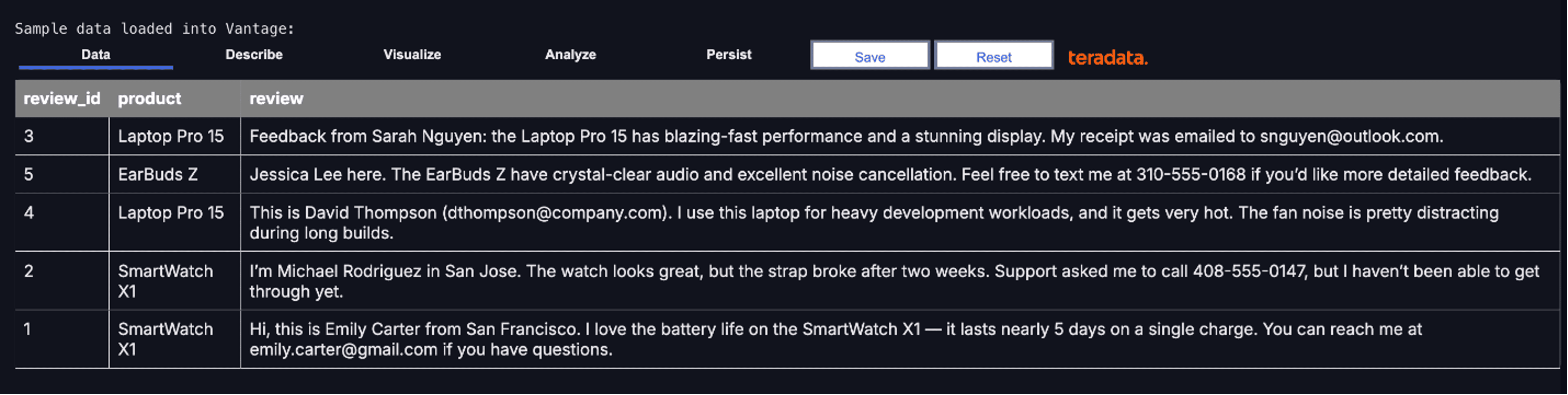
Customer review data loaded into Teradata, ready for large-scale text analytics and PII masking.
A TeradataML DataFrame can reference a table, a view, or even a complex query spanning open table formats and object storage. These datasets may range from thousands to billions of rows and often represent data joined across hundreds of tables.
While interacting with a DataFrame feels local, all computation is executed on Teradata’s massively parallel analytic cluster—enabling fast, scalable operations on data at any size.
We can now demonstrate how to run large-scale text analytics like masking sensitive data, analyzing sentiment, extracting key phrases, translating text, and generating summaries using models available in ModelHub.
Let’s start by configuring our connection to ModelHub and selecting the LLM we want to run tests with.
To begin running natural language processing operations with LLMs, we need a ModelHub endpoint, ModelHub key, and model name.
from teradatagenai import TeradataAI
from teradatagenai.text_analytics import TextAnalyticsAI
from teradataml import DataFrame

# ── Configuration ─────────────────────────────────────────────────────────────
# Replace with the endpoint URL and API key copied from AI Modelhub
MODELHUB_ENDPOINT = '{your_endpoint_url}' # e.g., 'https://your_instance.teradata.com/one-td/litellm/v1/chat/completions'
MODELHUB_API_KEY = '{your_api_key}' # Replace with your API key
MODEL_NAME = '{model_name}' # as shown in Modelhub

llm = TeradataAI(
api_type="nim",
model_name=MODEL_NAME,
api_base=MODELHUB_ENDPOINT,
api_key=MODELHUB_API_KEY
)

analytics = TextAnalyticsAI(llm=llm)
Select the ModelOps tab from the left bar menu.
Use ModelOps to move from notebook experimentation to governed deployment
This will open ModelOps in a new tab. ModelOps is Teradata’s model lifecycle management capability, enabling data scientists and ML engineers to train, evaluate, deploy, monitor, and retrain task‑specific ML models. Models developed in notebooks can move seamlessly into production with unified governance, observability, and auditability. The same lifecycle controls apply to LLMs, which is why ModelOps integrates seamlessly with AI ModelHub to manage both traditional ML and generative AI within a single platform.
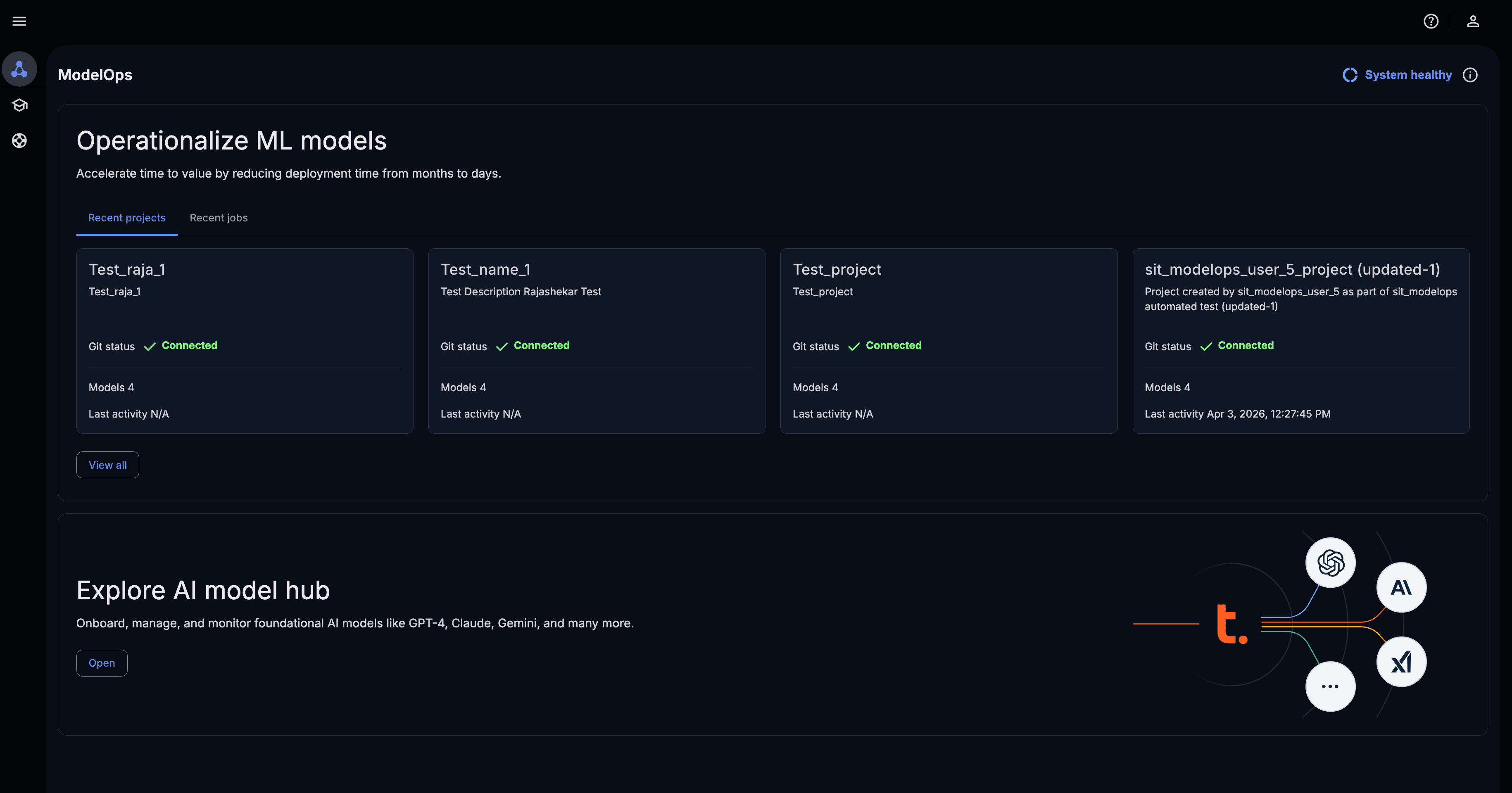
Operationalize and manage machine learning models at scale with ModelOps and integrated AI Model Hub.
Select Open in the bottom fold to explore the AI model hub, and enter your virtual API key to view the models your user has access to.
AI ModelHub
The AI ModelHub in AI Studio is a catalog of production-ready AI models, including LLMs, embedding models, and domain-specific models deployed and served within your Teradata environment as well as models from cloud service providers.
These models are exposed via LiteLLM and are designed to be accessed from Python using the teradatagenai package.
These same model endpoints can be reused for generative and agent-driven workflows. Both built-in Tera agents and customer-defined agents can invoke these endpoints, enabling centralized management, consistent access policies, and visibility into model usage across the platform.
This design keeps all inference inside your secure environment. No data leaves the platform, and no external API keys or internet access is required.
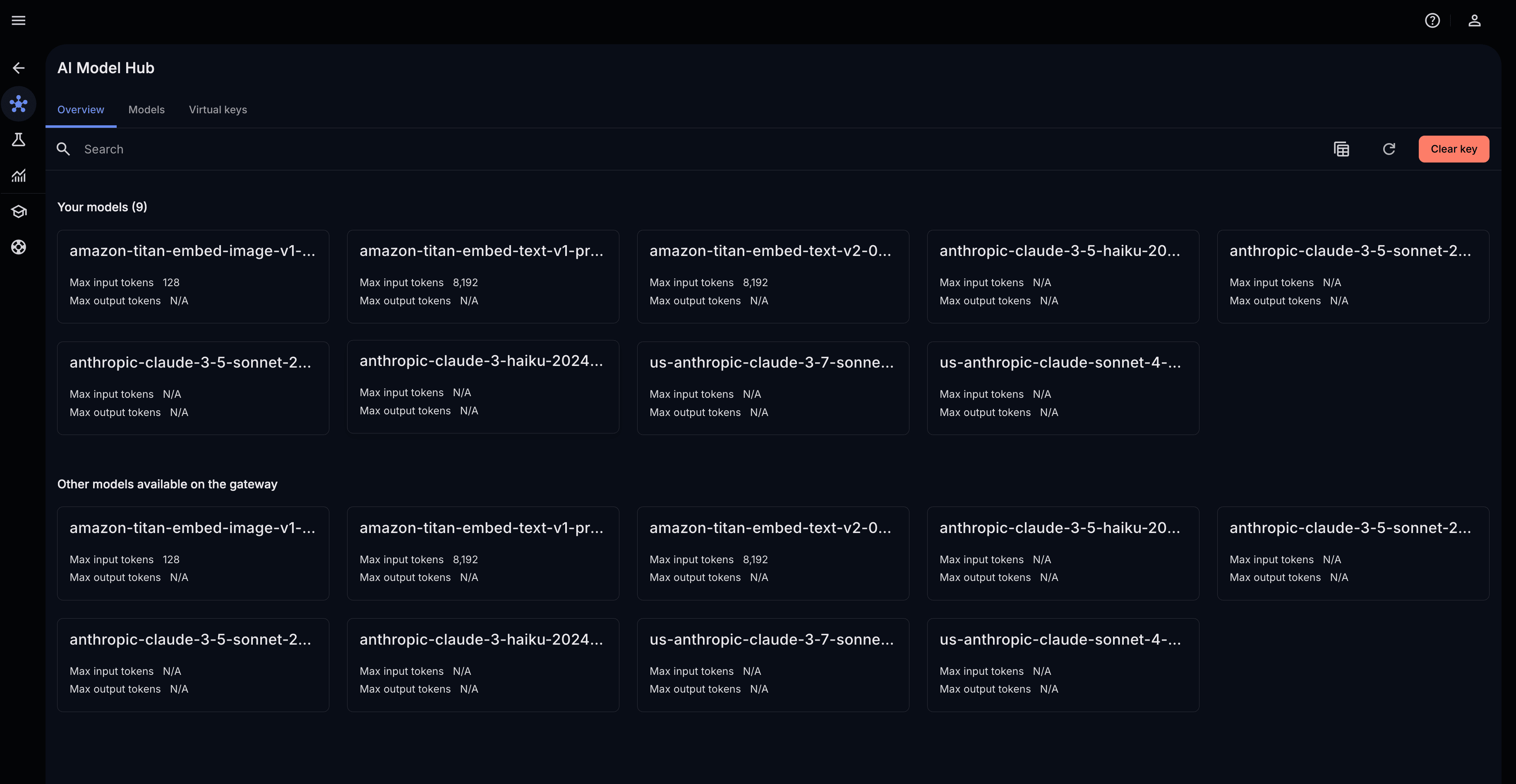
Browse and manage production-ready LLMs from Model Hub with centralized access, governance, and usage visibility.
Select a model card to view the required model name and the endpoint in the overview page.
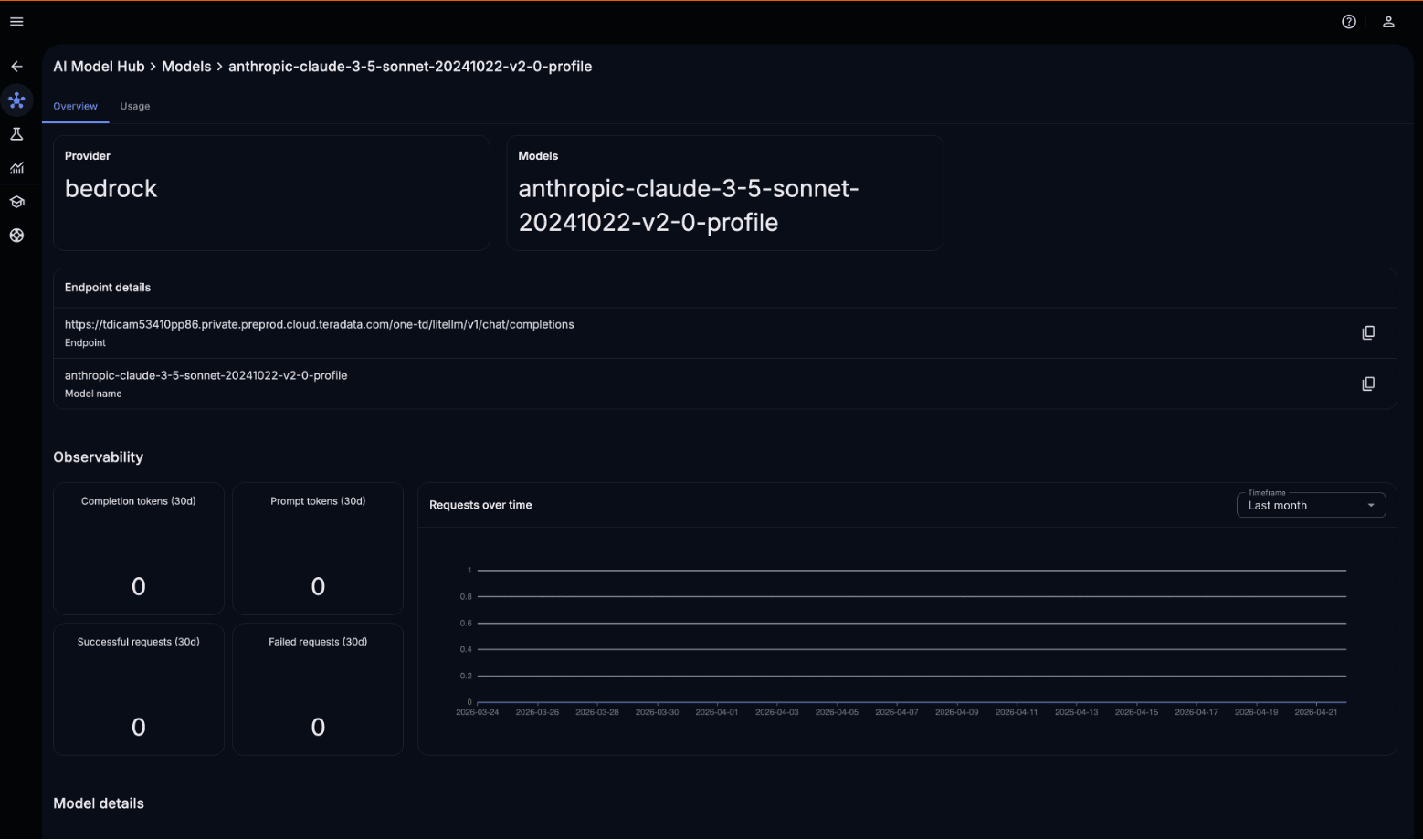
ModelHub model card details
With the proper credentials, we can now run our operation using teradatagenai. teradatagenai provides TextAnalyticsAI, a higher-level class that wraps the LLM to run text analytics operations directly on Teradata DataFrames. These operations combine the language model with your data at scale, pushing results back into Teradata without moving data to the notebook.
Supported operations include:
- analyze_sentiment() — classify emotional tone as positive, negative, or neutral
- extract_key_phrases() — identify the most important terms in each text
- summarize() — condense long text into a concise summary
- translate() — convert text between languages
- mask_pii() — redact personally identifiable information
masked_data = analytics.mask_pii(

data = df,

column = 'review',

id_col = 'review_id'

)

masked_data
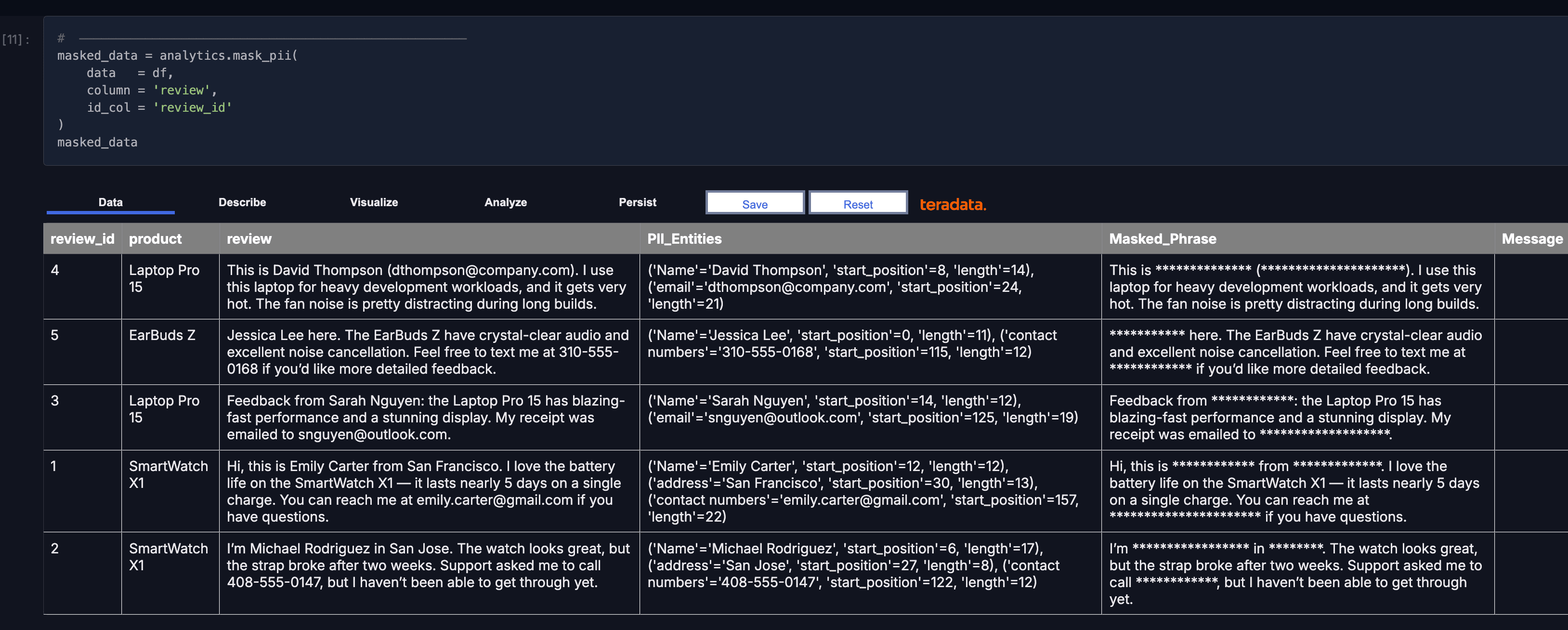
Run governed text analytics in-database and return results as tables.
Because this is running in database, the results will come back as a table just like other analytic results.
The important thing we just showed here is that we executed an LLM inside Teradata and against enterprise data—without leaving the platform, and with full security. This is an example of a first-class AI capability embedded in your data platform.
This is what it means to build AI in production without managing infrastructure. Developers work in notebooks as usual, while Tera agents handle execution, optimization, and governance when it’s time to take your workloads into production.
Request a demo of AI Studio by visiting https://www.teradata.com/about-us/contact.